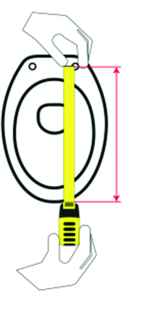
in cm
Measure from the mounting point to the front edge of the cover, as shown in the image.
cm


 Product Finder
Choose a category and the tool will show only criteria tied to actually available products at every next step.
The Product Finder organises your search into three simple steps and presents the most relevant options from the SPEK range.
Choose the main category. Only categories with available products are shown.
Only applications that actually exist in the selected category are shown.
This category does not require an additional application choice. You can continue.
If you know the length and width, enter them to narrow the suggestions. The images show exactly where to take each measurement.
Measure from the mounting point to the front edge of the cover, as shown in the image.
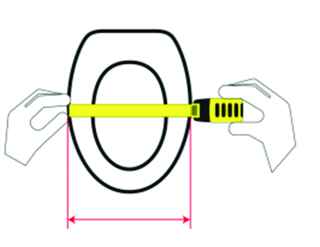
Measure the cover horizontally at its widest point, as shown in the image.
We will also show seat covers within 5 cm on each dimension. We check both measurement orientations, so a 50 × 40 cm product can also match a 40 × 50 cm search. The actual dimensions of every product are always shown in the results.
No problem if you do not know the dimensions. We will continue using only the category's actual available characteristics.
Every option shown below actually exists on products that already match the previous steps.
There are no additional technical filters for this combination. You can view the results directly.
If you do not know a specification, leave it blank. We do not show options that would lead to zero results.